Operations teams hemorrhage time on invisible work—endless email threads, status check-ins, and manual coordination that should be automated. According to When I Work, managers lose 5 to 11 hours weekly to manual coordination, yet modern workflow tools can reclaim up to 15 hours per week. Your team doesn't need another inbox overload; they need a system that routes approvals, tracks task progress, and surfaces real-time visibility without friction.
Quick Answer: The best workflow tool for operations teams depends on your team size and complexity. Modern platforms like Asana, Monday.com, and Zapier automate approvals, intelligent task routing, and reporting—replacing spreadsheets and email chaos with a centralized operations dashboard that keeps everyone aligned.
This guide walks you through what operations teams actually need, compares the top 10 tools for 2026, and shows you how to build workflows that stick. Whether you're managing client projects, internal processes, or cross-team handoffs, the right tool transforms chaos into clarity.
What Operations Teams Really Need From a Workflow Tool
If none of the tools below fits the way your team actually works, a custom ops dashboard is the other option, and it puts one interface over the systems you already pay for.
Operations teams don't need another task manager—they need a system built for repetitive, high-volume work. When knowledge workers spend 60% of their time on work about work instead of the skilled tasks they were hired for, according to SpeakWise, the culprit isn't lack of effort; it's friction in handoffs and visibility.
Core operational pain points demand specific solutions:
Intelligent routing — Inbound tickets, requests, and approvals automatically land with the right person, not whoever's email was on the thread
SLA tracking — Deadlines surface in real time; escalations trigger automatically when work risks slipping
Capacity visibility — Operations managers see who's bottlenecked and rebalance load before deadlines break
Repeatable processes — Recurring workflows (onboarding checklists, invoice processing, quality gates) run on autopilot
Native integrations — The tool connects to your payment processor, email, Slack, and accounting software without manual data entry
Generic project tools like Jira or Asana assume creative work with flexible timelines. Operations is different: high repetition, strict deadlines, and relentless volume. You need to replace spreadsheets with an internal approval system that surfaces bottlenecks and tracks SLAs automatically. The right workflow tool transforms operations from a coordination nightmare into a silent, scalable engine.
Workflow Management Tools, Automation, and Project Management Are Not the Same Thing
Three categories are sold under overlapping language, and buying the wrong one is the most common reason a rollout stalls six weeks in.
Workflow management tools model a process that repeats: stages, owners, handoffs, and a record of what happened at each step. The unit is the process. The test is whether the tool can tell you where every open item is stuck, right now, without someone building a report.
Automation tools move data between systems when something happens. The unit is the trigger. They are very good at removing copy-paste and poor at showing a manager the state of a queue.
Project management tools track work toward an end date. The unit is the project. Operations work rarely has one, which is why ops teams running on project software accumulate a board nobody ever closes.
Most operations teams need the first, buy the third because a licence already existed, then bolt on the second when it does not fit. The comparison below is limited to tools that can actually hold a repeating process.
Top 5 Workflow Tools for Operations Teams: 2026 Comparison
The previous section revealed why generic project management tools fail operations teams—they're built for creative timelines, not SLA deadlines. The five platforms below address operations' core needs: repeatable workflows, bottleneck visibility, multi-step approvals, and native integrations that eliminate manual data entry. Unlike traditional PM tools, these platforms transform scattered processes into scalable engines.
Monday.com: Best for Visual Workflow Automation
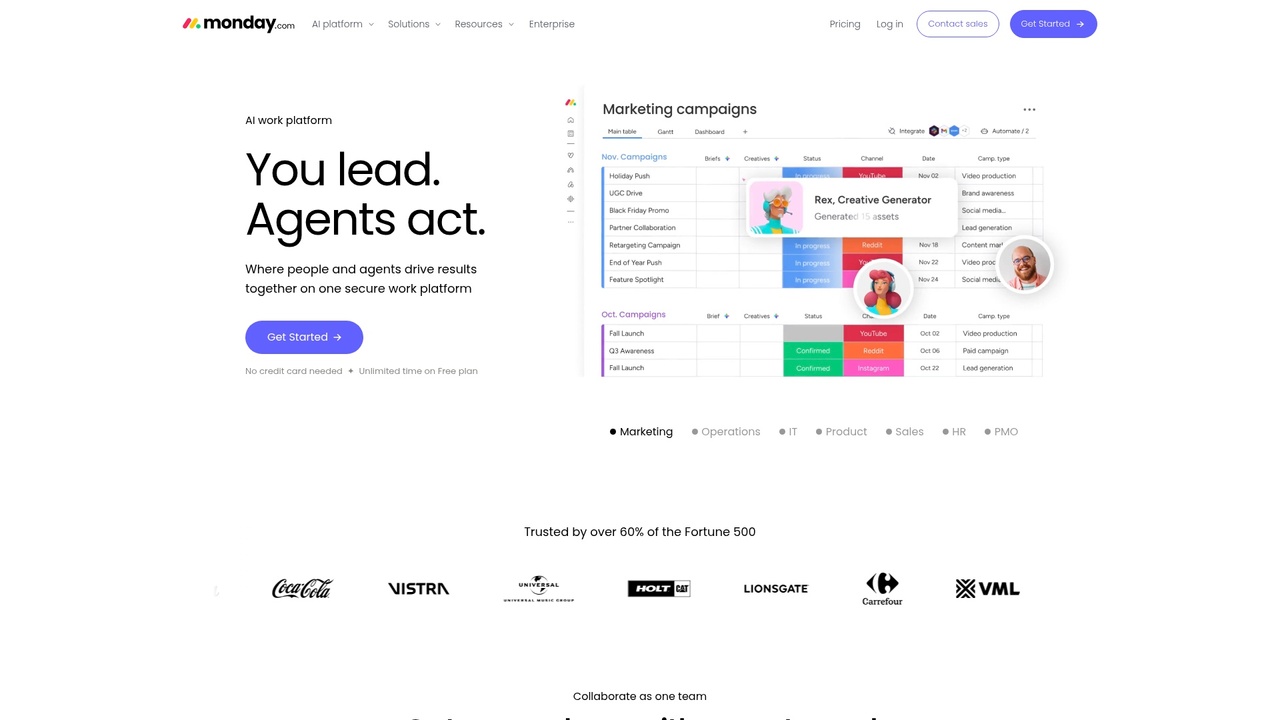
Monday.com's workflow builder lets operations teams move away from spreadsheets entirely. Custom automations trigger on conditions (task status, date fields, approvals), and visual dashboards surface bottlenecks in real time. The platform excels at quote-to-invoice workflow automation and capacity tracking across teams. You see exactly who's overloaded and rebalance work before deadlines break. Pricing starts at $9 per user per month on the Basic plan (billed annually), scaling to $12 and $19 per seat for Standard and Pro. A minimum of three seats applies. Monday's strength is its flexibility—you can model almost any operations process—but setup requires configuration effort.
Monday.com interface visualizing workflow pipelines and automation triggers.
Zapier: Best for Cross-App Workflow Automation
Zapier solves the integration nightmare. It connects to over 7,000 apps without code, syncing data between email, Slack, CRM, accounting software, and invoicing tools automatically. For a job tracking app for service businesses, Zapier is the connective tissue—it routes tasks, updates records, and fires notifications without manual intervention. Pricing starts at $19.99 per month (annual billing) for 750 tasks on the Professional plan, stepping up to $69 for the Team plan. Zapier is ideal if your ops stack is fragmented across multiple SaaS tools; it reduces the need for a centralized platform by making existing tools talk to each other. The limitation: Zapier is a connector, not a workflow designer—you'll still need another tool to own the core process.
Asana: Best for Distributed Operations Teams
Asana focuses on team accountability and transparency. Timeline views show dependencies and handoffs clearly; portfolio tracking gives ops managers visibility across multiple parallel processes. It's strong for teams managing multiple client projects or recurring service delivery cycles. $10.99 per user per month (Starter, annual) and $24.99 (Advanced) with a 2-seat minimum make it accessible. Asana's advantage is its emphasis on clarity—every task has an owner, deadline, and status visible to the team. The trade-off: it's less automation-focused than monday.com; you'll still handle approvals and escalations somewhat manually.
Jira Service Management: Best for IT & Support Operations
Jira Service Management is enterprise-grade for ticket-based workflows. SLA tracking, escalation rules, and queue management are baked in. Best for teams handling support requests or incident management where strict response times are non-negotiable. It's heavier to implement than other platforms on this list.
Notion: Best for Small Teams and Documentation
Notion databases and relations enable lightweight workflow tracking for smaller teams needing both process automation and centralized documentation. Pricing is flat ($12 per month or $168 annually), making it budget-friendly.
A central hub for monitoring all operational workflows.
Feature Comparison: What to Evaluate in a Workflow Tool
Not all workflow platforms are built equally for operations teams. While interface polish matters, what actually moves the needle is automation depth, integration reach, and real-time visibility. Operations teams juggling multiple parallel workflows don't have time to manually orchestrate every handoff or dig through nested menus for status updates.
Feature
Monday.com
Asana
Jira Service Mgmt
Notion
Automation Depth
High (conditional workflows, multi-step)
Medium (basic rules, limited triggers)
Very High (SLA-driven escalations, tickets)
Low (simple relations only)
Integration Count
200+ native
100+ native
150+ (IT/dev-focused)
50+ (heavy Zapier reliance)
Dashboard Visibility
Real-time, customizable
Strong portfolio view
Excellent SLA/queue view
Basic (static databases)
Approval Workflows
Native (conditional routing)
Manual-heavy
Automated (embedded in workflows)
Manual database approvals
Pricing
$12–$24/user/month
$10.99–$24.99/user/month
$75–$960/month (team tier)
$12/month (flat)
Setup Time
1–2 weeks
1 week
3–4 weeks (IT overhead)
2–3 days
What actually matters:Automation depth prevents manual bottlenecks—that's non-negotiable. Integration count determines whether you're building an off-the-shelf SaaS stack or cobbling together a brittle internal tool ecosystem. Dashboard visibility lets ops managers make decisions in real time rather than chasing status updates via Slack.
Most operations teams need automation depth, integrations, and visibility. You likely don't need all six criteria perfectly tuned—pick the best stack for internal tools based on your team's core pain: if you're drowning in approvals, prioritize automation; if tools are scattered everywhere, prioritize integrations.
Build a Custom Workflow Tool vs. Buy SaaS: What's Right for Your Team?
The build-versus-buy decision depends on team scale, workflow complexity, and budget constraints. Neither path is universally superior; the wrong choice simply costs more in licensing fees or engineering overhead.
When SaaS Wins: Budget, Speed, and Low Customization Need
SaaS workflow tools excel for teams under 50 people with straightforward, generic workflows. Deployment happens in weeks—Asana or monday.com go live within 10 business days. You avoid engineering overhead, ongoing maintenance, and hiring burden. For diverse tool stacks, SaaS integrations (however imperfect) beat building connectors from scratch. The downside: costs scale with headcount. At 100+ people, you're paying $24,000–$30,000 annually in licenses alone, which makes custom alternatives economically rational.
The trade-off between buying off-the-shelf software and building custom solutions.
When Custom Internal Tools Win: Repetition, Scale, and Unique Processes
Custom tools dominate when operations teams handle high-volume, repetitive workflows—quote-to-invoice cycles, job routing, multi-stage approvals. According to research from Kissflow, 60% of organizations achieve ROI within 12 months of workflow automation, with productivity gains of 25–30%. A custom admin panel for startup MVP reduces workflow friction by 40% versus stitching five SaaS tools together. Shipkit ships production-ready custom back office software in 6–8 weeks—eliminating the typical 6–12 month in-house development cycle. For operations teams over 100 people, licensing savings alone justify the investment within 18–24 months.
The Hybrid Approach: Workflow SaaS + Custom Integration Layer
Many growing teams choose a middle path: deploy best-of-breed SaaS (monday.com for coordination, Zapier for automation) plus a thin custom integration layer or lightweight dashboard. This reduces risk versus building from scratch while offering more flexibility than SaaS alone—ideal for teams transitioning from spreadsheets toward structured automation without full custom development risk.
How to Choose and Implement the Right Workflow Tool for Your Operations Team
Choosing the wrong workflow tool derails operations teams faster than choosing no tool at all. The decision shouldn't be rushed—but it also shouldn't paralyze your team for months. A structured 5-step evaluation framework filters noise and focuses on what actually moves the needle: saved hours, reduced errors, and team adoption.
Step 1–2: Document Your Current Workflows and Identify Bottlenecks
Before evaluating any tool, map reality. Shadow two team members for a half-day and list every workflow: email approvals, spreadsheet updates, status check-ins, manual data entry. Measure the cycle time for your three slowest processes (e.g., "request to invoice" takes 5 days). Identify the bottleneck: Is it approval delays? Lack of visibility? Manual handoffs? Write these down. Most operations teams discover that 60% of their pain stems from just 3–5 repeated workflows.
Step 3–4: Define Must-Haves and Calculate ROI
Create a feature scorecard: weight automation (30%), integrations (20%), cost (25%), and ease of use (25%). Now calculate rough ROI. If a workflow saves 2 hours per employee per week at $25/hour, that's $100/week or $400/month per person. For a 20-person team, one workflow improvement justifies a $5,000–$8,000 annual tool investment. Per research from CFlowApps, 74% of IT and engineering leaders report 11–30% time savings from process automation. Use this logic to defend your tool selection to leadership.
Step 5: Pilot, Learn, Scale
Run one workflow in parallel with your old process for 2 weeks. Measure time saved and team confidence. If adoption stalls, adjust. If it succeeds, expand to workflow #2. Most operations teams see full adoption across workflows within 4–6 weeks if the pilot validates the business case. This phased approach removes implementation risk and gives teams breathing room to learn before enterprise rollout.
Planning the strategic path for operational workflow implementation.
FAQs: Workflow Tools for Operations Teams
How long does setup actually take? Most SaaS tools get your first workflow running in 1–2 weeks. Configuration takes longer than deployment—you're mapping existing processes, not coding. For a custom CRM for service business use cases, expect 3–4 weeks to align integrations.
Will it connect to our CRM and invoicing stack? Modern platforms integrate via API or pre-built connectors. Check the tool's integration library against your existing systems (Salesforce, HubSpot, QuickBooks, Stripe). If you need deep customization, budget for a technical partner or custom integration work.
What if we outgrow it? Choose platforms with upgrade paths or API-first architecture. Many teams start with SaaS and migrate to custom-built solutions as complexity increases—build versus buy decisions are rarely permanent.
Do we need a dedicated person to manage it? No. Most tools require an admin (2–5 hours/week) to adjust workflows and troubleshoot, not full-time ownership. Start with your operations lead handling it.
How do we get team adoption? Run a pilot workflow, measure time saved, then show the team the win. Buy-in follows proof, not promises.
Workflow automation versus process automation? Automation handles repetitive tasks within a defined process. Process automation redesigns the entire workflow. Both matter—automate the right way first.
Conclusion: Choosing the Right Workflow Tool Sets Your Operations Team Free
The best workflow tool for your operations team isn't the flashiest or most feature-rich—it's the one your team will actually use. Whether you choose a SaaS platform like monday.com for immediate flexibility, build a custom internal tool for unique processes, or blend both approaches, the goal stays the same: eliminate manual coordination, reduce errors, and create visibility into what's moving. Start by mapping your top three workflow bottlenecks. The right solution—and the adoption that follows—will take care of itself.
Article FAQ
Practical next steps
Who is this startup guide for?
This guide is written for non-technical founders, operators, and small teams who need to make product decisions before hiring a full engineering team. It focuses on practical scope, cost, timeline, and execution trade-offs rather than abstract startup theory.
What should I do after reading this article?
Turn the idea into a small decision: validate the riskiest assumption, estimate the build scope, and decide whether the first version should be no-code, custom code, or a hybrid. Shipkit's free estimate and MVP scope builder can help you translate the article into a concrete plan.
Can Shipkit help implement this kind of product?
Yes. Shipkit helps founders turn validated ideas into fixed-scope MVPs, SaaS products, internal tools, marketplaces, and AI-enabled workflows. The best starting point is to get an estimate or compare your build path before committing budget.