A browser-based 3D configurator for a playground equipment manufacturer, where spatial planning and commercial configuration are the same action: place real catalogue products on a to-scale site, and the bill of materials and price are derived from the scene itself.
This case study focuses on the delivery constraints, product choices, and workflow decisions that shaped the build.
Model
Interactive 3D configurator
Rendering
Three.js / WebGL
Status
Production product
ClientRelief Plant
Service ProvidedProduct Design, Three.js Development, 3D Asset Pipeline, Full-Stack Development
Year2026
About Relief Plant 3D Configurator.
The Goal
A catalogue does not answer the question the customer actually has: will this configuration fit my site, and what will it cost? Those are spatial and commercial questions at once, and Relief Plant wanted them answered before the sales process starts.
The Challenge
The visual scene and the commercial data could never become two systems. Add one piece of equipment in 3D and the quote has to know exactly what was added — on ordinary office hardware, in a scene a real customer has filled, not a demo scene with one model in it.
The Result
Spatial planning and commercial configuration in one browser session, ending in a quote request rather than an enquiry. The client reported that sales generated through the configurator exceeded their initial expectations during the first month after launch.
Inside the Configurator.
For a manufacturer of playground equipment, a static catalogue can show individual products, a CAD drawing can show dimensions, and a spreadsheet can calculate price. A salesperson can connect all three — but only after the customer has already entered a sales process.
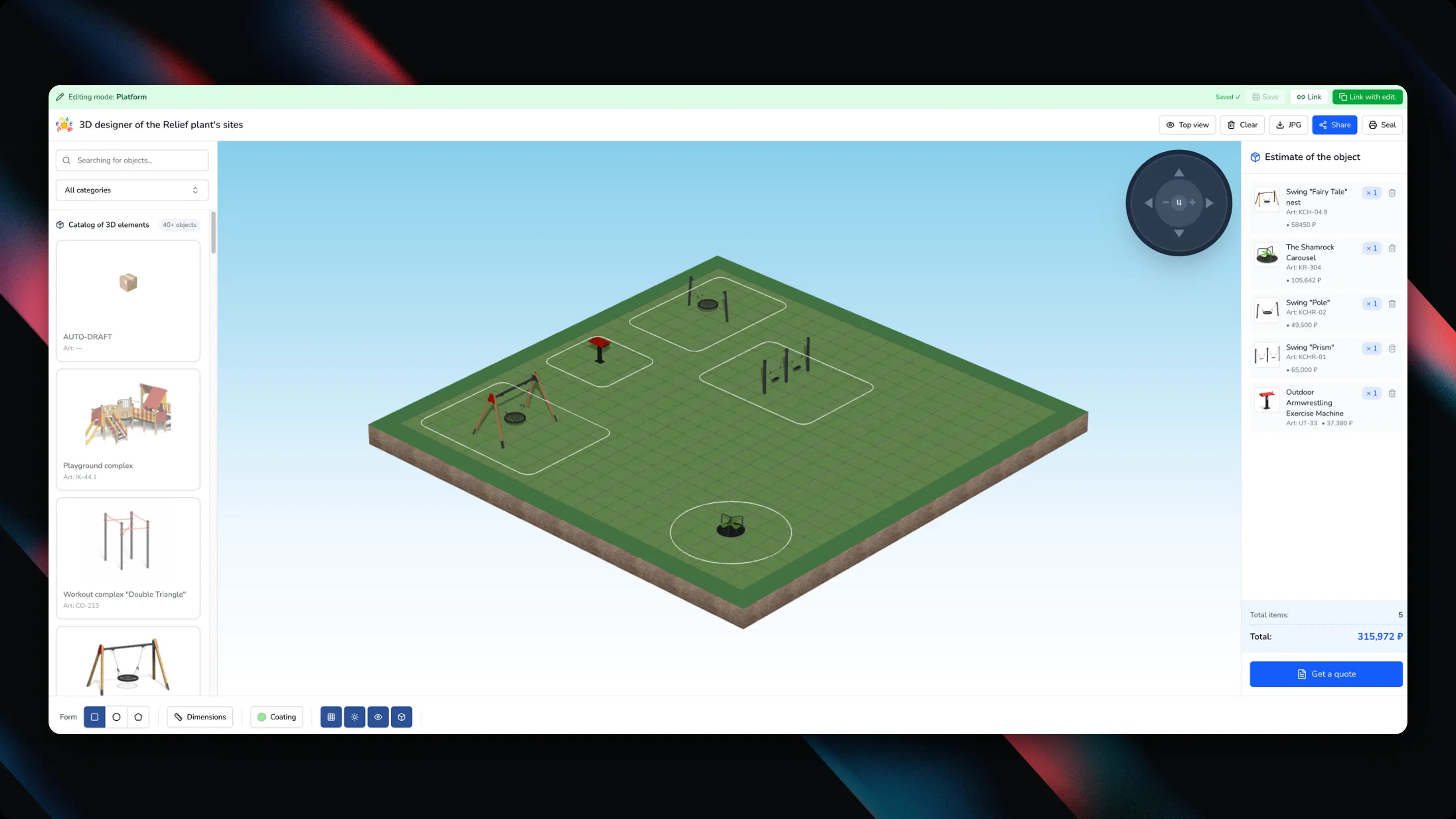
Relief Plant wanted to move that decision much earlier. Shipkit built a browser-based configurator where a customer defines the site, places actual catalogue products at scale, inspects the layout from any angle, and watches the commercial configuration update as the scene changes. The result is not a decorative 3D viewer; it is a sales application with a 3D editor at its centre.
An Editor and a Quoting System, Not a 3D Page
For playground equipment the customer is not only choosing products — they are composing a physical environment. The product has to answer how much space is available, which equipment fits, how items relate to one another, whether footprint zones overlap, what the configuration contains, what the current total is, and how the exact configuration reaches sales.
We therefore approached the project as an editor and quoting system rather than a 3D marketing page. That framing decided almost everything else about the architecture.
Catalogue on the left, live 3D scene in the middle, running bill of materials on the right — one workspace, not three screens.
Production 3D Assets Are Not Web Assets
A manufacturer may already have 3D models, but models made for engineering, rendering or production are rarely ready to drop into an interactive browser application. Every asset needed predictable rules around physical scale, orientation, pivot point, origin, naming, material setup, texture weight, bounding information, and catalogue identity.
Without that normalisation, one object imports at the wrong scale, rotates around an unexpected point, floats above the ground, or costs far more GPU memory than it should. We treated asset preparation as a pipeline rather than a one-time manual cleanup, so a new catalogue object enters the system in a repeatable way.
The Scene and the Quote Share One State
A common configurator failure is to build the 3D interface first and bolt pricing on later. That creates two states: what the customer sees, and what the commercial system thinks exists.
We avoided that split. Every placed product is tied to a structured catalogue item with its own identifier and commercial data, and the bill of materials is derived from scene state rather than maintained as a second manual list. Add, duplicate, delete, restore, or change a quantity through the scene, and the configuration and the commercial summary move together.
The 3D editor is therefore not drawing a picture of a quote. It is editing the quote itself.
A Real Scene, Not a Demo Scene
A beautiful product model performs perfectly when it is the only object on screen and collapses once a customer builds a complete site. The real performance question was not whether the browser can render the model, but whether it stays responsive after the customer has created a useful configuration.
We optimised around the whole scene lifecycle: model loading, reuse of assets and materials, texture and geometry weight, rendering only what contributes to the current view, efficient scene updates, avoiding unnecessary object recreation, and separating interaction state from expensive rendering work. The configurator had to remain usable on normal customer and office hardware, not only on a designer's workstation.
Spatial Precision Without Professional 3D Software
The target user is not a 3D artist or a CAD operator. World axes, transform gizmos, camera modes and snapping rules become intimidating very quickly, so the challenge was keeping enough control for real spatial planning while removing the feeling of operating professional software.
The interaction model was built around direct tasks: choose a product, place it, move it, rotate it, duplicate it, remove it, inspect the site, undo a mistake. Orbit, pan, zoom and top view support the task instead of becoming the task.
The Site Is Not One Fixed Rectangle
Real locations are not identical, so the configurator had to represent more than a generic flat canvas. Site setup includes dimensions and multiple geometry options, and the scene has to preserve a meaningful relationship between the available space and the equipment placed in it.
Once site geometry is editable it affects camera framing, placement boundaries, visual scale, footprint interpretation, saved project state and exported images. It had to be part of the scene model from the beginning rather than added around it.
Undo Has Commercial Consequences
Undoing a transform is easy in isolation. Undoing a commercial action means restoring all of its consequences: the 3D transform, the catalogue identity, the price contribution, the bill-of-materials quantity, the footprint state, and the saved scene representation.
That is why editor history was treated as state management rather than a visual trick.
A Shared Link Reconstructs the Project
Saving a screenshot is not enough. A useful configurator preserves the editable project so another person can reopen the same scene, which requires a stable serialised representation of site geometry, placed catalogue items, positions, rotations, quantities and configuration metadata.
The shareable link then becomes more than a marketing URL — it is a portable representation of a commercial project. Image export sits alongside it for proposals, print and email.
3D Had to End in a Sales Action
We deliberately avoided building an isolated playground sandbox. The project only becomes commercially useful if the customer can move naturally from experimentation to an actionable configuration, so the experience was designed as one continuous flow: define the site, configure in 3D, inspect the bill of materials, see pricing, save or share, request a quote.
The handoff preserves the work the customer has already done. Instead of receiving a note about liking the blue slide in the catalogue, the business receives a specific project assembled from known catalogue items.
The Result
A customer can move from an empty site to a concrete, priced arrangement built from real products without learning professional 3D software. For the manufacturer, the important output is not the rendered scene but structured intent: actual products selected, quantities known, the site in context, the configuration reopenable, and the project handed to sales in a form much closer to a quote.
The client later reported that sales generated through the configurator exceeded their initial expectations during the first month after launch.
Tech Stack
A realtime Three.js and WebGL scene graph with camera and object controls, over a normalised 3D asset system where every model carries consistent scale, pivots and catalogue identifiers. Application state holds a persistent scene representation, undo and redo history, saved projects and shareable configuration state; the commercial layer maps that state to article numbers, quantities, a bill of materials, live pricing and the quote workflow.
Three.jsWebGLBrowser-based 3DNormalized 3D AssetsUndo / Redo HistoryLive Bill of MaterialsPersistent Scene StateShareable ConfigurationsImage Export
Planning a similar product?
If you are scoping a marketplace, customer portal, or workflow-heavy MVP, start with the smallest transaction that proves the business works. Then estimate the cost, compare custom code against no-code, and decide which features belong in version one.
Why build a 3D configurator instead of a product catalogue?
A catalogue answers what a product is. A configurator answers whether it fits, what it looks like in place, and what the combination costs — which is what actually blocks a purchase. Every question the customer answers themselves is one that no longer needs a sales call.
What goes wrong when pricing is added to a 3D tool later?
You end up with two states: what the customer sees in the scene, and what the commercial system thinks exists. Deriving the bill of materials from scene state instead of maintaining it as a second list is what keeps add, duplicate, delete and undo from silently disagreeing with the quote.
Can existing manufacturing 3D models be used directly?
Rarely. Models built for engineering, rendering or production need normalising for the browser — scale, orientation, pivots, origins, naming, materials, texture weight, bounding data and catalogue identity. Treating that as a pipeline rather than a manual cleanup is what lets a new product enter the catalogue repeatably.
Can Shipkit build a configurator for a different product line?
Yes. The pattern — a 3D scene, a catalogue of real products with real prices, a live estimate derived from the scene, and a shareable saved project — transfers to furniture, modular buildings, equipment layout, and anything else sold as a configurable set. The starting point is an estimate of scope.