Migrating from Airtable to a Custom App: When and How to Make the Move
Alex
··10 min read
Most founders start with Airtable because it's fast, visual, and requires zero coding. Your team can build workflows, manage data, and automate simple processes in hours. But as your product scales—when you're handling real customers, processing payments, managing user accounts, or running complex business logic—Airtable begins to show its limits. The platform wasn't designed to be a customer-facing backend, and the cracks start appearing: performance slowdowns, security concerns, scaling bottlenecks, and the creeping realization that you've outgrown a spreadsheet-based system.
The question isn't whether Airtable is good (it is). The question is whether it's still right for your stage.
Quick Answer: You should migrate from Airtable to a custom app when you're serving real paying customers, processing sensitive data, or hitting performance limits that block your growth. If Airtable is still working for internal operations or early MVP validation, stay put. But if your product roadmap demands user authentication, integrations, or the ability to scale beyond a few thousand records—a custom application is the next logical step.
This guide walks you through the decision-making framework, the migration process, and how to know if now is the right time to move.
Red Flags: When Airtable Stops Working for Your Business
The moment you realize Airtable is slowing you down is usually the moment you're already frustrated. By then, you've already hit one of several hard limits that no-code platforms simply weren't designed to handle. Recognizing these red flags early—before they become crises—is the difference between a smooth migration and a scrambling rebuild.
Performance degradation under load is the first warning sign. According to research on Airtable's practical constraints, performance issues emerge around 20,000 records when you're using formula fields, rollups, or linked records across tables. Your customer portal slows to a crawl. Automations that used to run instantly now lag. Users complain about load times. This isn't Airtable being "bad"—it's being asked to do something it wasn't built for. A custom app, by contrast, scales predictably because the database and interface are engineered together.
API rate limits become a bottleneck. Airtable enforces a hard ceiling of 5 requests per second per base, regardless of your pricing tier. If you're integrating with payment processors, syncing customer data, or running frequent automations, you'll hit this wall. You can't pay your way out of it. A custom backend has no such constraints—you control the throughput entirely.
User authentication and access control get messy. Airtable's sharing model works fine for team collaboration, but customer-facing applications demand granular permissions, role-based access, and audit trails. You can't safely expose Airtable to your users. When you need to build a customer portal or let customers manage their own data, Airtable forces you into workarounds that feel fragile and insecure.
Integration complexity explodes. Each third-party connection requires a Zapier automation or custom script. As your product roadmap grows—payment processing, email delivery, analytics, inventory sync—managing dozens of integrations becomes a maintenance nightmare. A custom app lets you build integrations directly into the system, eliminating the middleman entirely.
If you're experiencing any of these, it's time to stop asking "should we stay?" and start asking "how do we move?"
Airtable to Custom App Migration: The Step-by-Step Process
Migration isn't a single event—it's a structured handoff. Breaking it into phases eliminates the chaos of trying to move everything at once and gives you clear decision points where you can pause, validate, and adjust course.
Phase 1: Audit and Plan (1–2 weeks)
Start by documenting what you actually have in Airtable. List every base, table, field type, automation, and integration. Identify which data is critical to your product versus what's just operational scaffolding. This distinction matters: you might not need to migrate your internal project management base, only customer-facing data. Assign a single owner to this audit—ambiguity here cascades into expensive rework later.
Phase 2: Data Export and Mapping (1 week)
Export your Airtable data as CSV files. This is straightforward, but the real work is data schema mapping: which Airtable fields become database columns? How do linked records translate into your new schema? Do you need to clean, deduplicate, or restructure data before import? This is where a spreadsheet-to-app migration checklist becomes invaluable—it forces you to think through edge cases before they become production bugs.
Phase 3: Architecture and Design (2–3 weeks)
Define your custom app's structure: database schema, API endpoints, authentication model, and user roles. This is where you solve the permission and integration problems Airtable couldn't handle. A custom backend lets you build payment processing, customer authentication, and third-party integrations directly into the system instead of stitching them together with Zapier.
Phase 4: Development and Testing (4–8 weeks)
Build the app incrementally. Start with core features—data display, basic CRUD operations, user login. Test thoroughly before moving to advanced features like automations or reporting. Parallel-run Airtable and your new app for 1–2 weeks to catch discrepancies.
Phase 5: Cutover and Decommission (1 week)
Migrate remaining data, flip the switch, and monitor closely for the first week. Keep Airtable as read-only backup for 30 days before shutting it down.
The entire process typically takes 8–14 weeks. Non-technical founders often partner with development agencies to compress this timeline and eliminate technical bottlenecks.
Cost and Timeline Expectations: Airtable vs. Custom App
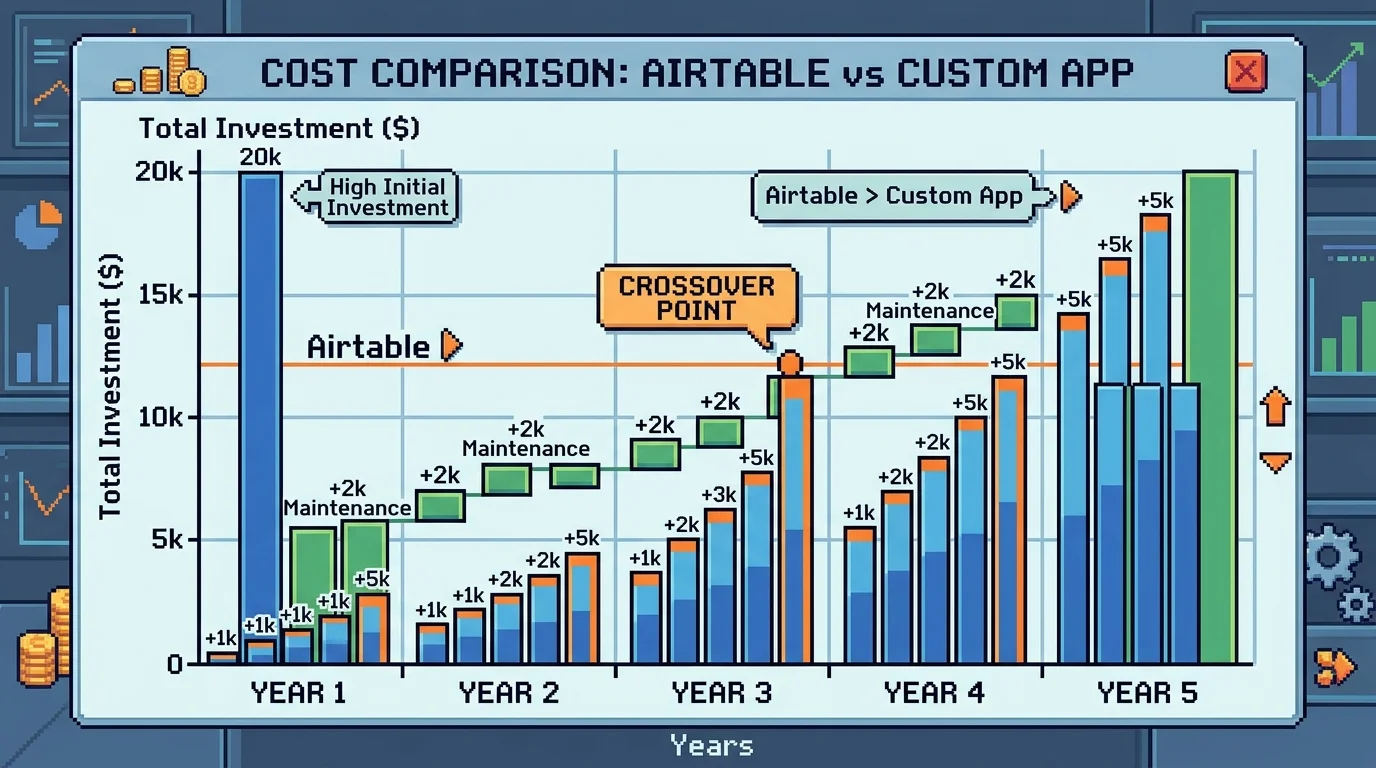
The financial picture shifts dramatically once you move beyond Airtable's initial appeal. On the surface, Airtable looks cheap—a Team plan costs around $2,400 annually for 10 users. But this calculation ignores the hidden tax of staying put: developer time spent building Zapier workarounds, feature delays while you wait for Airtable to add native functionality, and the friction of managing data across disconnected tools.
A custom app requires upfront investment, but the math becomes clearer when you factor in total cost of ownership. According to Appinventiv's 2026 analysis, custom app development typically ranges from $50,000 to $120,000 for small-to-mid business applications with core features. For a well-scoped MVP, you're looking at 8–14 weeks of development, though simpler applications can launch in 4–6 weeks.
Here's where the comparison matters:
Factor
Airtable (Year 1–2)
Custom App (Year 1)
Licensing costs
$2,400–$5,400/year
$0 (you own it)
Developer workarounds
40–80 hours/year
Eliminated
Feature delays
3–6 months per request
Built to spec upfront
Integration costs
$500–$2,000/year (Zapier, APIs)
Included in build
Timeline to launch
2–4 weeks (setup only)
8–14 weeks (full product)
The real advantage emerges after month six. Once your custom app is live, you're no longer paying per-seat licensing or burning developer hours on workarounds. Airtable's costs compound annually—especially if you hit the Business plan threshold and face a 125% price jump per seat. A custom app's maintenance is predictable: hosting ($50–$200/month), occasional feature updates, and no surprise scaling fees.
For founders building their first MVP, this trade-off is worth considering. You sacrifice speed for control and long-term cost efficiency. When you're ready to move beyond spreadsheet thinking, a custom application becomes the more rational choice—not just operationally, but financially.
Technology Choices: From Bubble to Next.js to No-Code Alternatives
When you decide to leave Airtable behind, you're not just choosing a new tool—you're choosing an entire philosophy about how your product will evolve. The spectrum of options ranges from staying within the no-code ecosystem to building fully custom applications, and each path carries distinct trade-offs.
No-code and low-code platforms like Bubble and Webflow remain attractive for founders who want to maintain speed. Over 4.69 million apps have been built on Bubble, helping users raise $15 billion in funding, making it a popular stepping stone for non-technical founders. These platforms excel at rapid iteration and visual feedback. However, they face real constraints as you scale: performance bottlenecks emerge under load, customization options become limiting, and you're still locked into a vendor's infrastructure and pricing model. A Bubble to Next.js migration, while more involved, often becomes inevitable once your user base grows or your feature requirements exceed what the platform allows.
Custom-built applications—whether using React, Next.js, or other frameworks—flip the equation. You sacrifice the speed of initial launch for complete control over architecture, performance, and long-term costs. There's no vendor lock-in, no surprise pricing changes, and no feature requests waiting months in a product roadmap that isn't yours. The trade-off is real: a custom app typically takes 8–14 weeks to launch versus 2–4 weeks for a no-code setup.
The decision hinges on your growth trajectory. If you're validating a hypothesis with minimal users, staying in Bubble or Webflow makes sense. But once you're confident in product-market fit and facing scaling challenges, custom development becomes the rational choice. Some founders attempt incremental migration—moving critical features to custom code while keeping peripheral systems in no-code tools—but this hybrid approach often creates more complexity than it solves.
When you're ready to move beyond spreadsheet thinking and no-code constraints, building a startup without a technical cofounder through professional development services ensures you get a production-ready application built to your exact specifications from day one.
Airtable Alternatives Worth Trying Before You Build
A custom app is not the only exit from Airtable, and it is the expensive one. Work through the lateral moves first: if an Airtable alternative fixes your problem, you have saved yourself a project.
If the wall is per-seat pricing, Baserow and NocoDB are open-source and self-hostable, which removes per-user cost entirely. You take on hosting in exchange.
If the wall is record limits or formula depth, Grist and SmartSuite handle larger datasets and more complex computed fields at comparable tiers. Stackby stays closest to Airtable’s interface, which matters when a team has to relearn it on a deadline.
If the wall is that staff keep breaking the base, no alternative fixes it. Every spreadsheet-database hybrid lets an editor delete a column that three automations depend on. The fix is an application with roles and validation sitting between the user and the data, and that is the custom path rather than a different vendor.
An Airtable alternative buys you room inside the same category. If you have already switched once and hit the same wall from a different angle, the constraint is the model, not the tool.
Key Questions to Ask Before You Migrate
Before you commit time and budget to migration, step back and answer these questions honestly. They form a decision-making framework that separates founders who are genuinely ready from those who might benefit from staying put a little longer.
Are you hitting real scaling limits, or just growing pains? Airtable handles thousands of records smoothly. If you're managing under 50,000 rows and your workflows still feel manageable, you may not need a custom app yet. The question isn't whether Airtable can scale—it's whether your current bottleneck is actually the tool itself or something else (team process, feature gaps, integration limits). If you can replace Google Sheets with a customer portal or internal dashboard and solve the problem for $5,000–$15,000, that's often smarter than a $40,000+ custom build.
Do you have budget and timeline clarity? Custom development typically costs $30,000–$80,000 and takes 8–14 weeks. Can you afford this without jeopardizing runway? Do you have 3–4 months to wait, or does your business need the solution in 4 weeks? If timeline is critical and budget is tight, no-code extensions or a hybrid approach might serve you better initially.
Is your feature set stable, or still evolving? Migrating mid-pivot wastes resources. Your requirements should be 80% locked down before development starts. If you're still experimenting with core workflows, stay in Airtable longer and validate first.
Who owns the decision? If you're the only person who understands your Airtable setup, migration becomes a single point of failure. A custom app should be documented and transferable to your team. If you lack internal technical capacity to manage the handoff, factor in onboarding time.
What's your risk tolerance? Custom apps mean vendor independence and long-term control—but also responsibility for maintenance, security patches, and infrastructure. Airtable shifts that burden to them. Neither is wrong; it depends on your comfort level.
Making the Migration Decision: Your Path Forward
Airtable remains an excellent choice for specific scenarios: internal team workflows, rapid prototyping, small-scale data management, and situations where you need to validate an idea before investing in custom development. It's genuinely powerful for these use cases, and choosing it initially isn't a mistake—it's a strategic decision that lets you move fast without technical overhead.
The inflection point arrives when your product becomes customer-facing, your workflows grow too complex for Airtable's constraints, or your data volumes exceed what the platform handles efficiently. At that moment, migration from Airtable to a custom application isn't a failure of the tool—it's a natural evolution of your business.
Here's what matters most: Be honest about your current state. If you're experiencing the red flags covered earlier—performance slowdowns, workarounds stacking on top of each other, or users asking for features Airtable can't deliver—migration deserves serious consideration. But if Airtable still serves your needs, stay there. The cost and complexity of building a custom app only makes sense when the benefits clearly outweigh the investment.
The decision ultimately hinges on three questions: Does your business model require a polished, customer-ready product? Can you commit 8–14 weeks and $30,000–$80,000 to development? Are your core workflows stable enough to lock down before building?
If you're uncertain whether your situation calls for migration, or you need guidance evaluating your Airtable setup against real-world constraints, building a startup without a technical cofounder often requires expert perspective. Consider scheduling a consultation with a development partner who can assess your specific needs and recommend the right path forward.
Article FAQ
Practical next steps
Who is this startup guide for?
This guide is written for non-technical founders, operators, and small teams who need to make product decisions before hiring a full engineering team. It focuses on practical scope, cost, timeline, and execution trade-offs rather than abstract startup theory.
What should I do after reading this article?
Turn the idea into a small decision: validate the riskiest assumption, estimate the build scope, and decide whether the first version should be no-code, custom code, or a hybrid. Shipkit's free estimate and MVP scope builder can help you translate the article into a concrete plan.
Can Shipkit help implement this kind of product?
Yes. Shipkit helps founders turn validated ideas into fixed-scope MVPs, SaaS products, internal tools, marketplaces, and AI-enabled workflows. The best starting point is to get an estimate or compare your build path before committing budget.