Converting Google Sheets into Web Apps for Startups: A Complete Approach
Alex
··11 min read
Every startup founder has been there: a spreadsheet that started as a simple tracker has morphed into a chaotic monster. Customer data scattered across tabs, manual calculations, redundant entries, version conflicts with collaborators. You're managing inventory in Google Sheets, processing orders through email attachments, and tracking metrics in three different places simultaneously. The spreadsheet works—until it doesn't. It's slow, error-prone, and unmistakably not a real product.
Yet here's the thing: that spreadsheet contains your actual business logic. Your data structure is already there. Your users are already entering information into it. The gap between "spreadsheet" and "web application" feels impossibly wide for non-technical founders, but it's far narrower than most realize. Converting that spreadsheet into a proper web app means transforming scattered data management into a scalable, professional tool your customers actually want to use.
Quick Answer: Converting Google Sheets into web apps lets startups move from manual spreadsheet management to automated, user-facing tools without building from scratch. By leveraging your existing data structure as a backend—or using platforms like Airtable as a foundation—you can launch a functional MVP in weeks, not months, while maintaining complete ownership of your product and code.
This guide walks non-technical founders through the complete journey: understanding why this approach works, recognizing when it's the right move, and executing the conversion with clarity and confidence.
The Right Time to Migrate from Google Sheets to a Web App
The moment you realize your spreadsheet has become a liability rather than a tool is the moment to act. But recognizing that moment requires understanding what actually breaks first—and it's rarely a single dramatic failure. Instead, it's a slow accumulation of friction: data entry taking longer, collaboration becoming chaotic, and manual processes consuming hours that should go toward growth.
Warning signs emerge in predictable patterns. Around 88% of spreadsheets contain errors and incorrect data, often due to manual data entry and copy-paste workflows. When your team is spending more time managing data than analyzing it, when you're sending spreadsheet versions back and forth instead of working in real time, when calculations break because someone accidentally overwrote a formula—these are signals that a spreadsheet has outgrown its purpose. Performance degradation is another clear indicator: Google Sheets typically starts slowing down around 100,000 rows, and the experience becomes unusable well before hitting the 10 million cell limit.
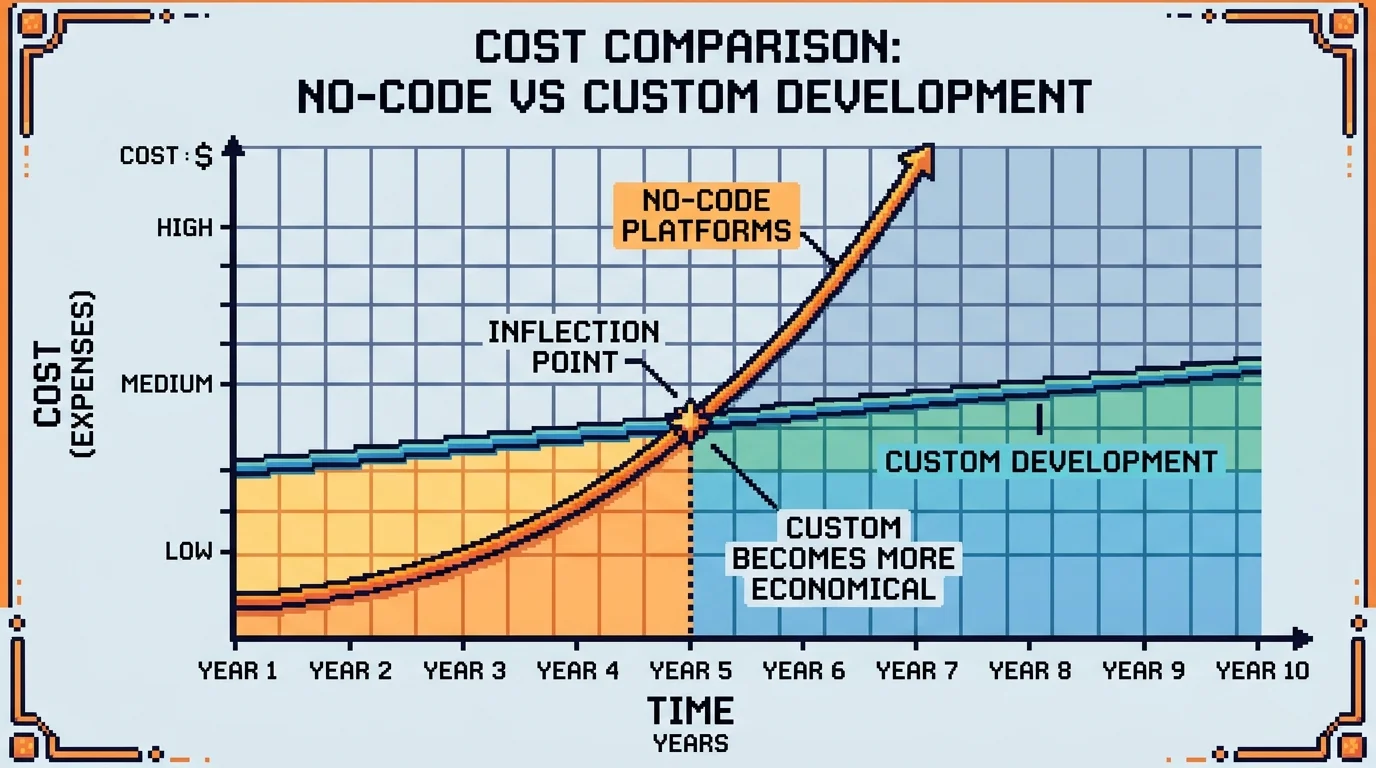
The decision between a no-code platform and a custom web app depends on your growth trajectory. No-code solutions work brilliantly when you need speed and flexibility, but they reveal their constraints as you scale. You'll recognize you've outgrown no-code when you need custom workflows that platforms don't support, when API limitations prevent integration with your other tools, when user permissions become too complex for the platform's model, or when you're paying exponentially more for features you'll never use. Custom apps become the logical next step when your business logic is unique enough that you're fighting the platform rather than working with it.
Evaluate honestly: Are you solving a temporary problem, or building the foundation of your product? If customers are asking for features, if manual processes are slowing revenue, if your team is frustrated—migration isn't premature. It's overdue.
Building Your First Web App: Data Preparation and Architecture
Before you write a single line of code, your data needs to be ready. This is where most migrations fail—not because the technology is hard, but because messy spreadsheets become messy databases. The structure you create now determines how scalable, maintainable, and fast your app will be later.
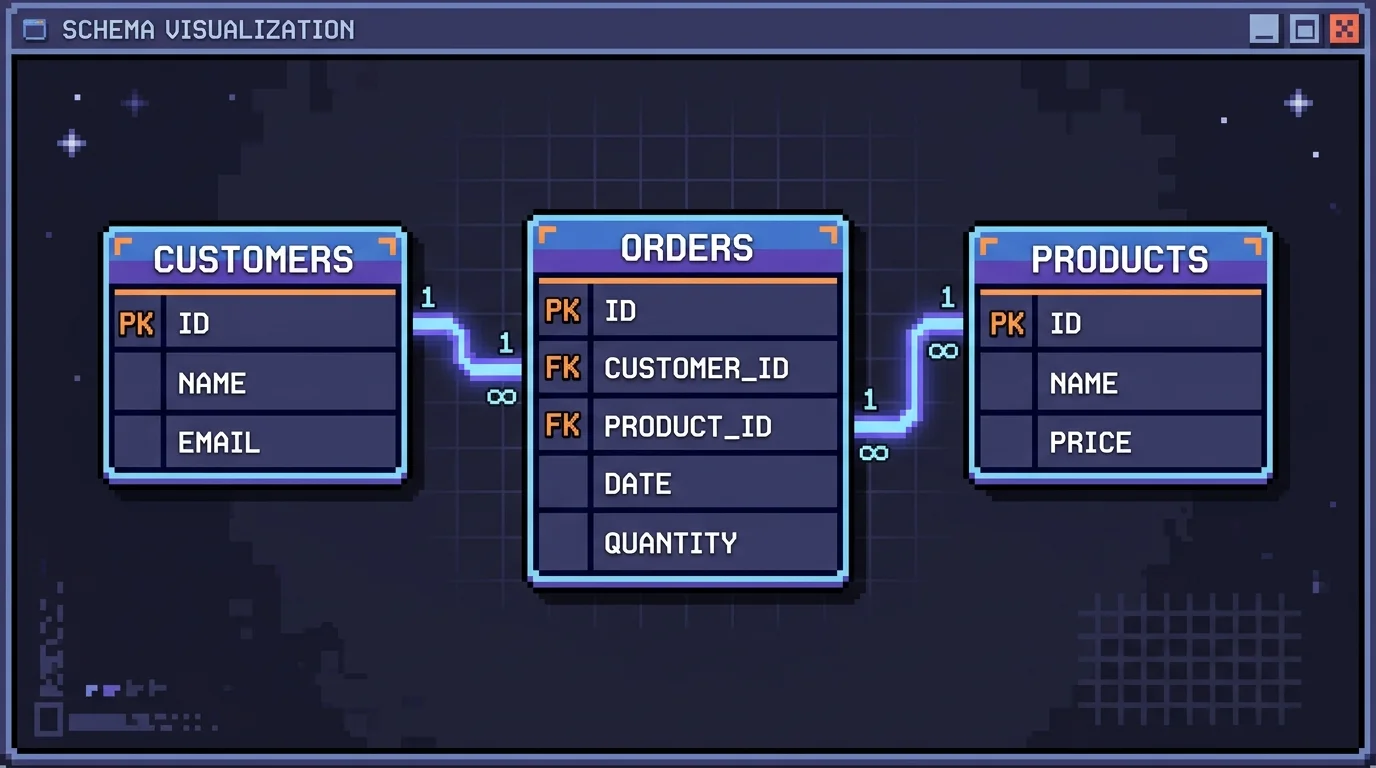
Start with table structure. Each sheet should represent a single entity: customers, orders, products, transactions. Avoid mixing multiple concepts into one table. Column names must be consistent, descriptive, and free of spaces or special characters—use snake_case (customer_id, created_date) rather than "Customer ID" or "Created Date". This isn't pedantry; it's how databases expect data to be organized. Remove merged cells, blank rows, and hidden columns entirely. These are visual conveniences in spreadsheets but become obstacles when converting to app-ready schemas.
Identify your key columns. Every table needs a unique identifier (ID field) that never changes and never repeats. This becomes your primary key in the database. Establish relationships between tables: which column in the orders table links back to the customers table? These foreign keys are how apps join data together. If you're currently using Airtable as a backend for MVP prototyping, you've already experienced this—Airtable enforces linked records because relational structure matters.
Data quality is non-negotiable. Audit for duplicates, missing values, and inconsistent formatting. A phone number stored as "555-1234", "5551234", and "(555) 123-4" will break validation logic in your app. Standardize dates to ISO 8601 format (YYYY-MM-DD). Remove test rows and placeholder data. If a column has 80% empty cells, decide: is it truly necessary, or should it be removed? Bloated schemas slow everything down.
Consider your growth trajectory. Design for 10x your current data volume, not just today's size. If you're planning to migrate from Airtable to a custom app eventually, build your Google Sheets structure with that endpoint in mind—normalized, clean, and ready to import. This preparation phase typically takes 1-2 weeks but saves months of debugging later.
No-Code Platforms vs. Custom Development: Making the Right Choice for Your Startup
The decision to stay with no-code or rebuild from scratch isn't binary—it's a function of your growth stage, feature complexity, and unit economics. No-code platforms like Bubble, Lovable, Knack, and AppSheet excel at speed: they reduce development time by up to 90% compared to traditional coding. For an MVP, this advantage is decisive. You launch in weeks instead of months, validate your market hypothesis faster, and preserve runway.
But here's where founders stumble: no-code platforms impose architectural constraints that become expensive to work around as you scale. Feature requests that take hours in custom code might require workarounds or third-party integrations in Bubble. Database query performance degrades under load. User management and payment processing integrations, while available, often lack the customization that SaaS products demand. The question isn't whether you can scale a startup on Bubble—you can—but whether you'll hit a ceiling where rebuilding becomes inevitable.
Factor
No-Code Platforms
Custom Development
Time to MVP
4–8 weeks
12–16 weeks
Monthly cost (100 users)
$500–$2,000
$3,000–$8,000
Feature flexibility
Limited by platform
Unlimited
Scaling complexity
High (platform limits)
Managed (your control)
Migration cost
$20K–$100K+ to rebuild
N/A
The data is sobering: 25–30% of no-code projects get rewritten in custom code within two years. This happens when founders outgrow the platform's constraints or when unit economics demand optimization that no-code pricing structures won't allow.
The real cost isn't building on no-code—it's rebuilding later. A Bubble to Next.js migration, for instance, means rewriting business logic, data models, and integrations. You're not just changing the foundation; you're rebuilding the entire house.
Consider this framework: if your product requires real-time collaboration, complex calculations, or custom payment logic, start custom. If you're validating a B2B SaaS concept with 50 early users and need to prove traction in 6 weeks, no-code wins. The inflection point typically arrives around 500–1,000 active users or when your feature roadmap demands capabilities the platform can't deliver without painful workarounds.
Shipkit bridges this gap by delivering production-ready custom applications with fixed pricing and full code ownership—eliminating the no-code trap entirely. You get the speed of rapid development without the technical debt of platform constraints.
Step-by-Step: Building a Web App from Your Google Sheet Data
The transition from spreadsheet to functional web application doesn't require deep technical knowledge if you choose the right platform and follow a structured approach. Here's how founders typically move their data from Google Sheets into a working customer portal or internal tool.
Step 1: Select Your No-Code Platform
Your choice of platform determines everything downstream—flexibility, scalability, and ultimately, whether you'll need to rebuild later. Evaluate based on three criteria: data capacity (can it handle your current and projected row count?), integration depth (does it connect natively to your payment processor, email service, or CRM?), and customization ceiling (can you build the exact UI your users expect, or will you hit walls?). Platforms like Airtable, Bubble, and FlutterFlow each excel in different scenarios. Airtable shines for database-heavy applications with moderate UI complexity. Bubble offers broader customization but demands more setup time. FlutterFlow prioritizes mobile-first design. Spend 2–3 hours comparing feature sets against your specific roadmap—this decision compounds over time.
Step 2: Connect and Import Your Google Sheet Data
Most no-code platforms offer direct Google Sheets connectors. Create a new data source in your platform's backend, authenticate your Google account, and select the specific sheet. The platform will map columns to fields automatically, though you'll need to verify data types (text, number, date, email) are correct. If your spreadsheet contains messy data—inconsistent formatting, blank rows, or duplicate entries—clean it first in Google Sheets. A 30-minute data audit here prevents hours of troubleshooting later. Once imported, test that row counts match and sample records display correctly.
Step 3: Design the User Interface
This is where your application takes shape visually. Build forms for data entry, tables for viewing records, and detail pages for individual items. Most platforms use drag-and-drop builders—place a text input field, connect it to your data source, and set validation rules (required fields, email format, character limits). Design for your actual users: if this is a customer portal, prioritize clarity and simplicity; if it's an internal tool for your team, efficiency matters more than polish. Expect 4–6 hours of iteration here as you refine layouts and test on mobile devices.
Step 4: Implement Security and Access Control
Before launching, lock down who sees what. Set up user authentication (email/password or OAuth via Google/GitHub), define role-based permissions (admin, editor, viewer), and restrict data visibility. A customer should only see their own records; your team should see everything. Test these rules thoroughly—attempt to access data you shouldn't be able to reach, then verify the system blocks you. This step is non-negotiable, even for internal tools.
Step 5: Test and Deploy
Run through your actual workflows end-to-end: create a record, edit it, delete it, export data. Invite 2–3 beta users outside your team to use the app for a week and report friction points. Deploy to a live URL once critical bugs are resolved. Monitor the first week closely for unexpected behavior, then iterate based on user feedback.
Planning Your Exit Strategy: Migration Paths When You Outgrow No-Code
Every founder who builds on no-code platforms eventually faces the same question: what happens when we outgrow this? The answer isn't panic—it's planning. Migration from no-code to custom development is inevitable for many startups, but it doesn't have to be chaotic if you approach it strategically.
Understanding the Real Costs
Migration cost from no-code to custom development typically ranges from $50,000 to $250,000 depending on application complexity, according to Design Revision's platform comparison analysis. Simple apps might cost $10,000–$25,000 to migrate, medium-complexity apps $25,000–$75,000, and complex platforms $75,000–$200,000. Beyond the initial build, ongoing maintenance for custom applications typically runs 15–20% of the initial development cost annually. These aren't just numbers—they're the difference between sustainable growth and financial strain.
The Migration Checklist
Before you migrate, audit your current system ruthlessly. Document every workflow, integration, and custom field. Export all historical data and test it in your new environment. Identify which features are truly essential versus those you added "just in case." Many founders discover they can simplify their feature set by 30–40% during this process, which directly reduces migration scope and cost.
Create a parallel-run period where both systems operate simultaneously for 2–4 weeks. This catches data inconsistencies and workflow gaps before they become production problems. Train your team on the new system while the old one still works—psychological safety matters.
What to Preserve, What to Abandon
Not everything from your no-code app deserves to survive the migration. Preserve your data architecture, user workflows, and business logic. Abandon workarounds and overcomplicated automations that custom code can handle more elegantly. The goal isn't a 1:1 replica—it's a cleaner, faster version built on a foundation that can actually scale.
Timing matters too. Migrate during a slower business period, never during peak season or right before a major product launch. Your team needs breathing room to adapt, and your customers need stability.
Moving Forward: Your Startup's Path from Spreadsheet to Web Application
The journey from spreadsheet to web application isn't a single decision—it's a series of strategic choices aligned with your business stage. Early-stage startups benefit from moving spreadsheet workflows into lightweight internal tools that cost less and launch faster. But as you scale, custom development becomes inevitable. The question isn't whether to migrate eventually; it's when and how to do it without disrupting operations.
Your path depends on three factors: complexity of your business logic, frequency of feature changes, and growth trajectory. A simple inventory tracker might live in a no-code platform indefinitely. A marketplace with dynamic pricing, user roles, and payment processing needs custom code from the start. Most founders discover this truth through experience—which is exactly why planning for migration matters before you're forced into it.
If you're ready to invest in a production-grade application built for scale, a technical co-founder alternative handles the complete journey: specification, development, deployment, and integrations. This eliminates the friction of hiring, managing, and onboarding a technical team while you focus on product-market fit.
The spreadsheet-to-app conversion is viable and cost-effective. Your next move depends on where you stand today.
Article FAQ
Practical next steps
Who is this startup guide for?
This guide is written for non-technical founders, operators, and small teams who need to make product decisions before hiring a full engineering team. It focuses on practical scope, cost, timeline, and execution trade-offs rather than abstract startup theory.
What should I do after reading this article?
Turn the idea into a small decision: validate the riskiest assumption, estimate the build scope, and decide whether the first version should be no-code, custom code, or a hybrid. Shipkit's free estimate and MVP scope builder can help you translate the article into a concrete plan.
Can Shipkit help implement this kind of product?
Yes. Shipkit helps founders turn validated ideas into fixed-scope MVPs, SaaS products, internal tools, marketplaces, and AI-enabled workflows. The best starting point is to get an estimate or compare your build path before committing budget.