Building a Document Q&A App for Business: Complete Strategy Guide
Alex
··10 min read
Quick Answer: A document Q&A app is an AI-powered system that lets employees ask natural language questions about company documents, policies, and knowledge bases—and get instant, accurate answers instead of spending hours digging through files. Businesses need them because employees waste nearly two hours daily searching for information, and modern AI makes it possible to build intelligent systems that understand context and deliver precise responses in seconds.
The shift toward AI-powered document intelligence represents a fundamental change in how organizations manage knowledge. Rather than maintaining sprawling filing systems or relying on institutional memory, companies now deploy smart assistants that index their documents and answer questions conversationally. According to McKinsey research, employees waste 1.8 hours daily searching for information—equivalent to hiring five people but only getting four's worth of productivity. That gap is exactly where document Q&A apps step in.
The adoption curve is steep. Organizations recognize that building a private AI assistant for company documents eliminates bottlenecks in onboarding, customer support, and internal operations. Whether you're a startup scaling without institutional knowledge or an enterprise managing thousands of documents across departments, the business case is clear: time saved multiplies across your team.
This guide walks you through the complete strategy for building a document Q&A app—from understanding core architecture and choosing the right technology stack, to launching an MVP and scaling to production. You'll learn what features matter most, how to integrate with existing tools, and realistic costs and timelines for bringing this to market.
Core Capabilities: What Makes a Document Q&A App Work
A document Q&A app succeeds or fails based on four interconnected capabilities working in concert. Understanding how they function—and why they matter to your business—is essential before you build or choose a platform.
Document Ingestion and Text Extraction forms the foundation. Your app needs to accept documents in multiple formats (PDFs, Word files, web pages, databases) and convert them into machine-readable text. This sounds simple until you encounter scanned PDFs, tables with complex layouts, or documents with embedded images. Poor extraction leads to incomplete knowledge—your AI assistant answers questions based on partial information, frustrating users and eroding trust. When building a document assistant, extraction quality directly impacts answer accuracy.
Contextual Understanding is where modern AI shines. Rather than simple keyword matching, your app uses embeddings—mathematical representations of meaning—to understand what a document is about, not just what words it contains. This is the foundation of Retrieval-Augmented Generation (RAG), the architecture powering most production document Q&A systems. RAG works by retrieving the most relevant document chunks when a user asks a question, then feeding those chunks to a language model to generate a grounded, sourced answer. This approach keeps responses factual and traceable, critical for compliance-heavy industries.
Answer Retrieval and Generation completes the loop. When a user asks "What's our return policy?", the system searches your document corpus for relevant passages, ranks them by relevance, and synthesizes a conversational answer with source citations. According to GoSearch AI research, knowledge graphs reduce resolution time by 28.6% through personalized, grounded responses—because users get answers and proof of where those answers came from.
Why This Matters Operationally: Customer support teams stop repeating themselves. Onboarding accelerates when new employees query company policies directly. Compliance audits become easier when every answer is traceable to source documents. The business impact compounds across departments—fewer support tickets, faster decision-making, reduced institutional knowledge loss.
When evaluating how to build an AI document assistant, prioritize extraction quality and RAG architecture. These two elements determine whether your app becomes a trusted tool or a frustrating liability.
Real-World Use Cases Where Document Q&A Apps Deliver Immediate Value
Customer Support Automation. Support teams drown in repetitive questions—"What's your refund policy?" "How do I reset my password?" "When will my order arrive?" A document Q&A app lets customers self-serve by querying your help docs, FAQs, and policies directly. According to research from ISG, AI-driven automation has reduced customer service operational costs by 30%, with some companies seeing savings between 30% and 70%. Your support team shifts from answering routine questions to handling complex issues that actually need human judgment.
Internal Knowledge Sharing and Onboarding. New employees waste weeks hunting through shared drives, wikis, and email threads to understand company processes. A document Q&A system becomes your always-on knowledge base—employees ask "What's our approval workflow for vendor contracts?" and get instant answers with source citations. Institutional knowledge stops walking out the door when someone leaves.
Policy and SOP Assistant. Compliance-heavy industries (finance, healthcare, legal) live by documentation. A policy and SOP AI assistant ensures employees reference the correct version of procedures, reducing errors and audit risk. HR teams stop fielding "Is remote work allowed on Fridays?" by pointing people to the system.
Legal Document Review. Law firms and in-house counsel teams use document Q&A apps to extract clauses, obligations, and risk flags from contracts in seconds rather than hours. "What are the termination conditions in this vendor agreement?" gets answered instantly with exact clause references.
Compliance Documentation. Auditors demand proof that policies are accessible and followed. A queryable document system creates an audit trail—every answer is traceable to source material, making compliance reviews faster and defensible.
The common thread: these use cases eliminate friction, reduce human error, and create accountability. Each one compounds operational efficiency across your business.
Evaluating Document Q&A Solutions: Key Features and Selection Criteria
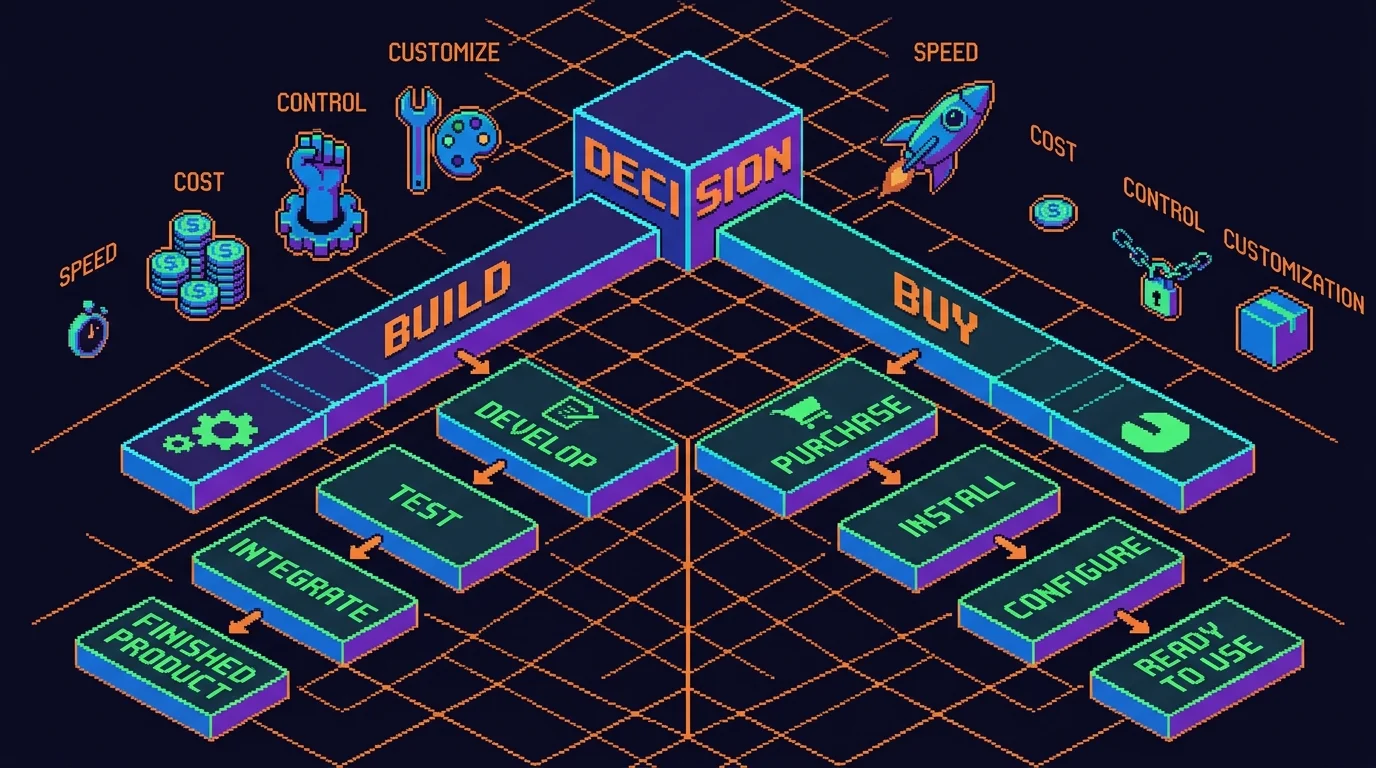
Choosing between building a custom document Q&A system and purchasing an existing platform hinges on three factors: your data readiness, timeline pressure, and long-term control requirements. The decision isn't purely technical—it's strategic.
The Build vs. Buy Reality
Enterprises increasingly favor purchasing pre-built AI solutions over developing in-house. According to GoSearch AI's enterprise AI knowledge management guide, companies shifted from a 50/50 build-versus-buy split in 2024 to purchasing 76% of AI solutions in 2025, as production-ready platforms launch faster than custom models. However, this trend masks a critical dependency: 61% of companies admit their data assets aren't ready for generative AI due to unstructured, siloed, or poor-quality data. A sophisticated platform won't fix garbage input.
Essential Feature Checklist
When evaluating any document Q&A solution—whether you're building or buying—assess these non-negotiables:
Feature
Why It Matters
Custom Build
Off-the-Shelf
AI Accuracy & Source Citations
Hallucinations destroy trust; citations prove answers are grounded
High control, slower time-to-market
Proven models, faster deployment
Role-Based Access Control
Legal and compliance teams need document-level permissions
Fully customizable
Often template-based, may require configuration
Integration Capabilities
Your system must connect to Slack, email, internal wikis, CRMs
Build exactly what you need
Limited to pre-built connectors
Scalability & Performance
Response latency matters when users expect instant answers
Scales with your infrastructure
Vendor handles scaling, you pay per usage
Audit Trails & Compliance
Every query and answer must be logged for regulatory review
You control logging depth
Varies by vendor; verify before committing
When to Build: The RAG Advantage
Custom development makes sense when you're implementing retrieval-augmented generation (RAG) for highly proprietary workflows or when your data contains sensitive competitive intelligence requiring air-gapped infrastructure. Building also wins if you need a knowledge base chat application deeply embedded into existing internal tools—think a Slack bot that queries your company's entire policy library without external API calls. The trade-off: you own the complexity of data ingestion, model fine-tuning, and infrastructure maintenance.
When to Buy: Speed and Predictability
Off-the-shelf platforms excel when you need to launch within weeks, not months. They handle model updates, security patches, and scaling automatically. For startups and mid-market teams, this eliminates the burden of hiring ML engineers or managing vector databases. The cost is predictable upfront—unlike custom development, where scope creep and data quality issues can balloon expenses.
The Data Readiness Question
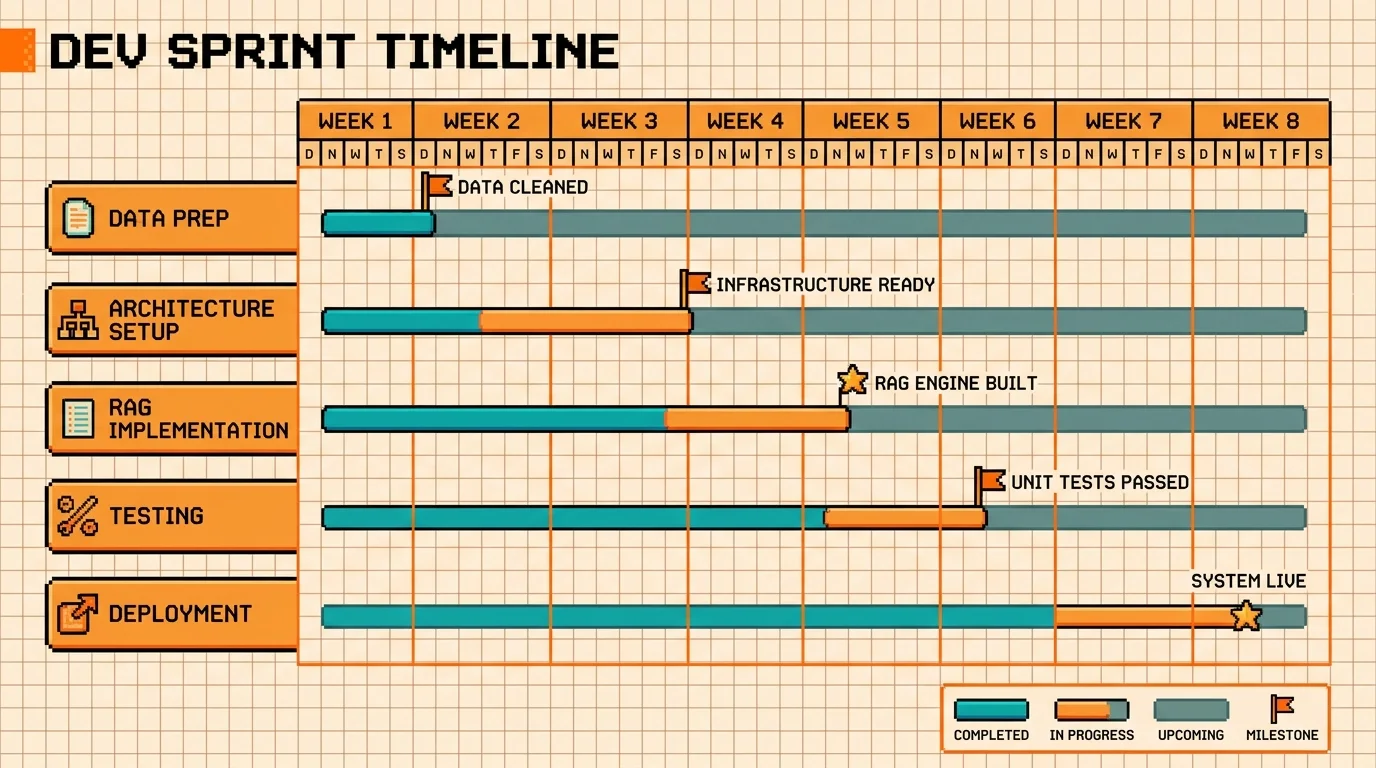
Before choosing either path, audit your documents. Are they OCR'd or scanned images? Scattered across 15 different systems? Written in inconsistent formats? These aren't platform problems—they're data problems. No solution, custom or commercial, performs well on garbage. Budget 2-4 weeks for data preparation regardless of which route you choose.
Building Your Own Document Q&A MVP: Timeline, Budget, and Technical Approach
The decision to build a document Q&A app in-house hinges on three factors: how much control you need, how quickly you need to launch, and what budget you're working with. A focused MVP—one that answers questions from a single document repository with basic role-based access—is achievable within 4-8 weeks if you partner with experienced developers. The cost structure varies significantly based on data complexity and infrastructure choices.
MVP Scope: What Actually Matters
Your first version should do one thing well: ingest documents, index them into a vector database, and return accurate answers to natural language queries. Skip fancy features like multi-language support, advanced analytics, or custom model fine-tuning. Your MVP needs a document upload interface, a simple search UI, and integration with an LLM API (OpenAI, Anthropic, or similar). Role-based access controls—ensuring employees only see documents they're authorized to query—should be built in from day one, not bolted on later. This prevents compliance headaches and keeps your legal team happy.
Timeline and Cost Reality
According to research on AI MVP development costs, basic implementations using pre-built models typically range from $15,000 to $30,000, while more complex solutions with significant data preparation can exceed $100,000. For a focused document Q&A app, expect 4-6 weeks if your documents are clean and well-organized, or 6-8 weeks if they require OCR processing or format standardization. The technical stack is straightforward: a RAG (Retrieval-Augmented Generation) architecture using a vector database like Pinecone or Weaviate, an LLM API for response generation, and a backend framework (Python with FastAPI or Node.js) to orchestrate the pipeline.
The Non-Technical Founder's Advantage
You don't need to hire an ML engineer or understand vector embeddings to ship this. A development partner experienced in building production-ready applications can handle the entire stack—from data ingestion to deployment—while you focus on user feedback and iteration. This approach eliminates the hiring delays and technical debt that plague in-house teams, letting you validate product-market fit within weeks rather than months.
Next Steps: From Evaluation to Implementation
The path forward hinges on three straightforward decisions. First, define your document Q&A needs with precision: What problems are you solving? Which departments will use this? How many documents are we talking about, and in what formats? Clarity here prevents costly pivots later. Second, assess whether to build or buy by weighing your timeline against customization requirements. Off-the-shelf solutions move fast but constrain your workflow; custom development takes 4-8 weeks but delivers exactly what your business needs. Third, start with an MVP to validate before scaling—launch with your highest-impact use case (customer support, onboarding, or HR queries) and measure adoption and time savings.
The advantage of custom development becomes clear when your requirements are specific and your timeline is tight. Rather than forcing your workflows into a generic platform, a development partner builds your exact system—from document ingestion through user interface—while you focus on gathering customer feedback. This eliminates the hiring friction and technical overhead that plague in-house teams.
Your next move: Schedule a conversation with a technical partner who understands RAG architecture and has shipped production AI applications. Discuss your document volume, user count, and success metrics. A realistic scope and timeline emerge within hours, not weeks.
Article FAQ
Practical next steps
Who is this startup guide for?
This guide is written for non-technical founders, operators, and small teams who need to make product decisions before hiring a full engineering team. It focuses on practical scope, cost, timeline, and execution trade-offs rather than abstract startup theory.
What should I do after reading this article?
Turn the idea into a small decision: validate the riskiest assumption, estimate the build scope, and decide whether the first version should be no-code, custom code, or a hybrid. Shipkit's free estimate and MVP scope builder can help you translate the article into a concrete plan.
Can Shipkit help implement this kind of product?
Yes. Shipkit helps founders turn validated ideas into fixed-scope MVPs, SaaS products, internal tools, marketplaces, and AI-enabled workflows. The best starting point is to get an estimate or compare your build path before committing budget.